The price difference between Audacity and Adobe Audition might leave you stunned. Recent data from the 2024 Podcaster Gear Survey shows Audacity as the top choice for podcast software. Adobe Audition trails behind with 9.9% for recording and 15.9% for editing. These numbers make perfect sense – Audacity costs nothing, while Adobe Audition users need to shell out $22.99 monthly with a yearly commitment.
These audio editors have rich histories behind them. Adobe Audition’s journey started as Cool Edit Pro and has been the go-to choice for audio professionals for more than 20 years. Audacity has built its reputation among hobbyists and professionals since 1999. The real question isn’t about Audacity’s status as a DAW (Digital Audio Workstation), but how well it matches up against Adobe Audition’s premium features. To name just one example, both tools offer noise reduction, though Audition handles strong hissing sounds more effectively.
Adobe Audition’s price tag of $34.49 monthly or $263.88 yearly raises an important question – does it provide enough value for the cost? The answer depends on your specific needs. This comparison looks at everything from their easy-to-use interfaces to advanced editing capabilities to help you pick the right audio editor for your work.
Pricing Models: Free vs Subscription-Based
The pricing models of these two audio editors show a stark contrast in how they approach software distribution and making money.
Audacity: 100% free and open-source
Audacity is deeply rooted in the free software ecosystem without any hidden costs or subscriptions. The team behind Audacity has made it clear that the software “always been and will always remain free for everyone”. This goes beyond just being free – anyone can view or modify its source code. The numbers prove its popularity, with over 114.2 million downloads from FossHub since March 2015. Before that, users downloaded it more than 200 million times from Google Code and SourceForge. The software runs under the GNU General Public License (GPL-2.0 or later), which keeps it truly free.
Adobe Audition: Monthly and annual subscription tiers
Adobe Audition takes a different path with its subscription-only model that has several payment options:
- Monthly payment: $34.49 per month with no commitment
- Annual commitment with monthly payments: $22.99 per month (totaling $275.88 annually)
- Annual payment: $263.88 upfront
You won’t find a one-time purchase option for Audition. Adobe does give you a seven-day free trial, but you’ll need to provide credit card details that automatically switch to a paid plan unless you cancel.
Long-term cost comparison: 1 year vs 3 years
The price gap grows significantly over time:
- Audacity: $0 no matter how long you use it
- Adobe Audition (1 year): $263.88-$413.88 based on how you pay
- Adobe Audition (3 years): $791.64-$1,241.64 total investment
This is a big deal as it means that the three-year cost difference can reach over $1,200 – enough money to buy professional recording gear or other audio tools. In spite of that, many professional users find the subscription costs worth it due to productivity gains and advanced features.
Bundled Adobe Creative Cloud pricing
The Creative Cloud bundle makes more sense if you need multiple Adobe apps:
- Monthly payment: $89.99 with no commitment
- Annual commitment with monthly payments: $59.99 per month
- Annual payment: $659.88 upfront
This package gives you Audition plus 20+ other Adobe applications with 100GB cloud storage. Content creators who need Photoshop, Premiere Pro, and other creative tools often find this valuable. Students and teachers get special rates starting at $19.99 per month for the first year before moving to regular pricing.
Your choice between Audacity and Adobe Audition really depends on whether you need professional features or have budget limits. Many users find Audacity works well as an Adobe Audition alternative.
User Interface and Learning Curve
The interface design plays a crucial role in how users work with these audio editors, beyond just the price factor.
Original Setup: Simplicity vs Customization
Audacity shows a practical interface with a clean, direct design that has standard dropdown menus and clearly labeled toolbars. The layout uses large, chunky controls with a bright, welcoming look that makes recording simple – you just select your input device, pick mono or stereo, and click the red Record button. Users find it easy to start because it looks like familiar tape/CD players.
Adobe Audition uses modern design principles with a sleek, professional interface that lines up with other Adobe Creative Cloud apps. The workspace has detailed technical panels with effects racks and file information on the left, Essential Sound options on the right, and audio tracks in the center with many controls. You’ll need to complete multiple steps to record even a simple track – picking input hardware, selecting the right recording mode, and arming tracks in multitrack mode.
Navigation and Tool Access
Audacity’s design focuses on linear editing with audio tracks in a timeline format. Users find basic tasks like cutting, copying, and pasting audio segments user-friendly. The software creates separate sections automatically when you start and stop recording, and you can drag these between tracks easily.
Audition gives you two options with its Waveform and Multitrack modes, and you’ll need to pick the right one for your work. This advanced approach ended up giving more control but you just need more technical knowledge to start.
Beginner Friendliness: Which is easier to learn?
Audacity stands out as the more available option with its gentle learning curve. The software benefits from a huge online community built over twenty years that provides thousands of tutorials, complete documentation, and active user forums. This rich learning environment makes it a favorite among podcasters and sound hobbyists.
Adobe Audition provides structured learning resources through official Adobe tutorials and training materials built to professional standards. Creative Cloud subscribers can access Adobe’s learning platform that has curated courses from industry professionals.
Interface Customization: Fixed vs Flexible Layouts
Audacity comes with limited customization options and most functions are available through the main window or dropdown menus. Adobe Audition gives you much more workspace flexibility by letting you arrange panels and save custom layouts for different project types. Professionals find this customization great for complex workflows but beginners might feel overwhelmed at first.
Editing Features and Workflow Efficiency
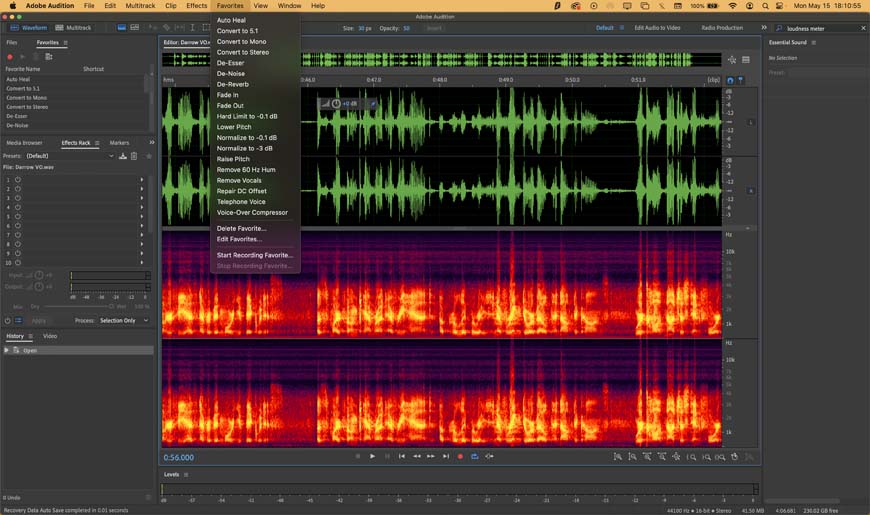
Image Source: Shotkit
A deep dive into the editing toolsets reveals key differences in how these programs handle audio tasks.
Multitrack Editing: Basic vs Advanced Layering
Audacity’s multitrack capabilities have evolved into a robust system that keeps source material intact during editing. The implementation stays simple compared to Audition’s refined approach. Adobe Audition delivers smoother multitrack editing and greater flexibility, which makes complex arrangements easier to manage. Audition’s clip-based system creates easy-to-use slip editing and automatic crossfades when clips overlap, while Audacity needs a more manual, step-by-step process.
Noise Reduction Tools: Manual vs Adaptive
These editors use similar noise reduction processes at their core—users select unwanted noise samples before applying reduction. Audacity users select the Noise Reduction effect and click “Get Noise Profile,” while Audition users right-click highlighted areas to select “Capture Noise Print”. Audition stands out with its “Adaptive Noise Reduction” feature that analyzes and removes noise without needing pre-selected samples. Beginners might find Audacity’s noise reduction easier to grasp at first, but Audition’s approach gives professionals better results.
EQ and Compression: Presets and Real-Time Preview
Both platforms’ equalization tools work like mixing desk controls with frequency band sliders. Audition sets itself apart with its rich presets and immediate preview features. Users must click “Preview” to hear EQ adjustments in Audacity, while Audition lets you hear changes as you make them. The applications offer normalization functions, and Audition’s “Match Loudness” tool adjusts files to podcast-ready levels without manual tweaking.
Batch Processing and Automation Options
Audition shines with its complete batch processing features through multitrack mixdown and favorites rack presets. This system applies similar effects chains to multiple files at once—saving crucial time on big projects. Audacity offers basic batch features through its “Chains” (now “Macros”) but can’t match Audition’s capabilities. The difference becomes clear when handling many files, as Audition queues complex editing tasks to run overnight without supervision.
Many professionals think Audition’s subscription cost makes sense because of these advanced editing features, though Audacity works well for simpler projects.
Plugin Support and File Compatibility
Plugin support and file compatibility are vital factors that set Audacity and Adobe Audition apart as production tools.
Third-Party Plugin Integration: VST and AU Support
The plugin architecture makes these editors substantially different. Adobe Audition works with VST3 and VST plugins on Windows and Mac, while Mac users get Audio Units (AU) plugins too. This three-format support lets Audition users access almost any modern audio plugin.
Audacity packs a surprise by supporting even more plugin formats – VST, AU, LADSPA, and LV2 plugins. This makes it a great Adobe Audition alternative for people who already have plugin collections.
Each platform handles plugins differently:
- Adobe Audition: Users need to scan through the Audio Plug-in Manager. They can add custom folders for VST plugins and turn specific effects on or off
- Audacity: The system finds compatible plugins automatically in standard system locations
Stability with Professional Plugins (Waves, iZotope)
Adobe Audition handles professional-grade plugins more reliably. Its robust architecture works well with demanding plugins from Waves and iZotope. Audacity users sometimes run into issues with premium plugins because of its lighter architecture.
Supported File Formats: MP3, WAV, FLAC, etc.
These editors handle common audio formats differently:
Adobe Audition supports a complete range of formats that professionals need. It excels at handling broadcast-standard files.
Audacity works with most common formats including MP3, WAV, VOX, GSM, WMA, AU, AIF, FLAC, OGG, AAC, M4A, MID, AMR and others. It uses LAME for MP3 encoding, “which is generally considered to be the best MP3 encoding library”.
Exporting Options and Quality Settings
The export features show how these platforms differ:
Audacity gives users fine control over MP3 exports. Sample rates range from 32kHz to 48kHz, with options for variable, average, or constant bit rate encoding. Quality presets go from “Medium” (good for podcasts) to “Excessive” (320kbps for music).
Adobe Audition takes exports further with batch processing that applies similar settings to multiple files. Professional users appreciate Audition’s ability to export uncompressed 24-bit audio (44.1-48kHz) that’s ready for mastering.
Both programs prove themselves capable audio editors. Audacity shows impressive plugin compatibility despite being free.
Use Cases: Which Editor Fits Your Needs?
Your choice between Audacity and Adobe Audition depends on what you need for audio production and how much you want to spend.
Podcasting: Simplicity vs Advanced Control
The 2024 Podcaster Gear Survey shows Audacity as the top podcast software, while Adobe Audition has captured 9.9% for recording and 15.9% for editing applications. Audacity’s popularity comes from its simple recording setup. The Audio Setup dropdown sits right in the main window, letting users select microphones and watch levels through clear meters quickly. This setup works great for podcasters who need reliable recording without complex procedures.
Adobe Audition shines with its multitrack recording features that capture multiple sources at once with separate level controls. Podcasters who deliver final assets to distribution platforms save time with its advanced export options.
Voice-Over Work: Perception and Output Quality
Client perception plays a big role in choosing software for voice-over production. Many professionals call Adobe Audition the best platform for voice work. You can grab a noise sample and remove that unwanted sound from the entire file with its complete audio restoration tools.
Adobe Audition’s adaptive noise reduction detects unwanted sound automatically. Audacity works well enough for simple voice-overs and lets you clean up background noise from recordings.
Music Production: Track Mixing and Effects
Adobe Audition gives you a complete mixing environment that matches professional digital audio workstations. Each track has its own effects chain, automation parameters, and routing options – perfect for complex music productions. Projects with lots of layering become much easier to handle in Audition’s environment.
Audacity works as a tool to layer different audio elements rather than a true non-destructive mixing environment. Its multitrack features have improved but still have limited track interaction.
Remote Recording Limitations and Workarounds
Both editors struggle with remote interview recording. Modern solutions like Riverside or Descript work better by recording locally on each participant’s device. These specialized tools give you studio-quality remote audio recordings without quality loss. They work better than either Audacity or Audition alone for interview-based podcasts.
Comparison Table
| Feature | Audacity | Adobe Audition |
|---|---|---|
| Pricing | Free | $22.99/month (annual commitment) or $34.49/month (no commitment) |
| Annual Cost | $0 | $263.88-$413.88 |
| Interface Type | Simple, clear design | Modern, professional interface with customizable workspace |
| Learning Curve | Simple, user-friendly | Complex with steeper learning requirements |
| Multitrack Editing | Simple, hands-on process | Advanced features with automatic crossfades and slip editing |
| Noise Reduction | Manual reduction with sample selection | Adaptive reduction + manual options |
| Plugin Support | VST, AU, LADSPA, and LV2 | VST3, VST (Windows/Mac), AU (macOS only) |
| Plugin Stability | Some issues with premium plugins | Stable performance with professional plugins |
| File Format Support | MP3, WAV, VOX, GSM, WMA, AU, AIF, FLAC, OGG, AAC, M4A, MID, AMR | Detailed format support for broadcast standards |
| Best Suited For | Simple podcasting, hobbyists | Professional audio work, complex music production |
| Market Share (Podcasting) | Most popular podcast software | 9.9% for recording, 15.9% for editing |
| Customization | Few customization options | Full workspace customization with saveable layouts |
Conclusion
Your choice between Audacity and Adobe Audition will depend on what you need and how much you want to spend. Audacity is the clear winner when it comes to saving money – it gives you amazing features completely free. Adobe Audition packs professional features that many serious audio producers find worth the subscription cost.
The price gap tells a clear story – Audacity costs nothing while Audition could set you back over $1,200 in three years. This makes Audacity perfect for beginners, hobbyists, and anyone watching their budget. In spite of that, many professionals find Audition’s advanced multitrack editing, adaptive noise reduction, and uninterrupted workflow justify the monthly cost.
New podcasters will find everything they need in Audacity. Its easy-to-use interface, simple noise reduction, and core editing tools handle most podcast needs well. This explains why it’s become the go-to software for podcasting.
Audio professionals working on voice-overs, complex music production, or broadcast content tend to prefer Audition. The sophisticated editing environment, immediate previews, and extensive batch processing save time that maybe makes up for the subscription costs.
Both programs keep getting better. Audacity improves its multitrack features while staying free, and Audition refines its professional tools within the Adobe ecosystem. Users at every level have solid options whatever their budget.
You should try both – Audacity’s free download and Audition’s seven-day trial will help you figure out which one feels right for your projects. Note that the best audio editor isn’t the one with the most features but the one that helps you meet your audio goals quickly.
The real question isn’t about how much money Audacity saves compared to Adobe Audition – though it definitely does – but whether the free option has enough features for what you need to do.
![[12] Best Plugins for Audacity in 2026 (Free Downloads)](/wp-content/uploads/2026/01/a8946991-9c92-4963-9410-0dcb946193d2.webp)