Audacity plugins can take your audio editing from good to exceptional. You’re missing out on powerful audio tools if you haven’t explored Audacity’s plugin ecosystem yet.
This open-source software serves both beginners and intermediate users well. Audacity’s full potential comes alive with the right plugins that extend its capabilities. The software works with many formats like VST, VST3 (in version 3.2 and above), LV2, LADSPA, Audio Units (mac OS only), and Nyquist FX plugins. The best news? Most Audacity plugins come at no cost. Companies like CrumplePop give away their RustleRemover and PopRemover plugins for free.
Let me walk you through the 12 best plugins that will revolutionize your Audacity experience in 2026. These free plugins range from VST tools for advanced audio effects to specialized vocal enhancement solutions. They help create professional-quality output without spending a dime. On top of that, you’ll learn how each plugin tackles specific audio editing challenges in podcasting, music production, and other creative projects.
CrumplePop

Image Source: Boris FX
CrumplePop is a detailed suite of AI-powered audio restoration tools that merges naturally with Audacity. Boris FX owns these plugins that process audio on your device instead of the cloud. Your audio data stays on your computer.
CrumplePop Key Features
CrumplePop has an impressive set of specialized tools to improve audio:
- Voice Enhance: This AI-powered tool improves voice clarity whatever your recording environment
- AudioDenoise: Takes out hiss, background noise, and hum
- EchoRemover: Gets rid of echo and reverb from recordings
- WindRemover: Takes care of wind noise in outdoor recordings
- TrafficRemover: Cleans up automobile traffic noise
- ClipRemover: Fixes audio recorded at too high volumes
- LevelMatic: Balances audio levels automatically
- PopRemover: Cleans up plosive sounds in vocals
- RustleRemover: Cleans lavalier microphone noise
CrumplePop also has SoundApp, a desktop application that brings these tools together. It works great for users who prefer working outside their DAW.
CrumplePop Pros and Cons
Pros:
- Your audio stays private with local processing
- See results instantly with up-to-the-minute processing
- Simple controls make it user-friendly
- Works with many host applications including Audacity
- Save presets to use in different projects
Cons:
- You can’t buy plugins one at a time
- Linux users can’t use it
- Uses lots of CPU power
- Advanced users might want more manual controls
CrumplePop Pricing
Here’s what CrumplePop costs:
- Free Starter Plan: You get RustleRemover and PopRemover
- Single Host Subscription: $18 monthly or $180 yearly (one plugin format)
- Multi-host Subscription: $29 monthly or $276 yearly ($23 monthly with annual billing)
- Perpetual License: $599 gets you the complete suite with multi-host support
- Upgrade & Support Renewal: Current users pay $195
CrumplePop Best Use Case
Podcasters and content creators love CrumplePop because it fixes audio problems quickly. You don’t need to be an audio engineer. Just drag and drop to fix recordings with background noise, echo, or wind.
Audacity users find CrumplePop’s AudioDenoise and ClipRemover plugins particularly helpful. These tools use AI to spot audio problems but stay simple to use. Turn the central knob, listen to your audio, and hear the difference.
Muse FX

Image Source: MuseHub
Muse FX is a versatile bundle of 12 audio effects that will enhance your Audacity toolkit. This free collection gives you a complete solution to boost your audio projects with a simple interface.
Muse FX Key Features
Here’s what you get in this complete suite of audio tools:
- Simple Control Design: Each plugin has an easy-to-use interface with straightforward controls and presets for quick results
- Complete Effects Collection: The bundle has reverb, delay, compressor, chorus, pitch correction, rotary, EQs, harmonizer, auto-panner, de-esser, and noise gate
- Reverb: The Velvet algorithm creates lush hall sounds or simple room ambiance
- Delay: You can sync to host tempo and adjust note values for left and right channels
- De-esser: This tool removes harsh sibilance from vocals and tames harsh frequencies
- Noise Gate: You get a wall around instrument sounds that records only desired audio while filtering out background noise
- Pitch Fix: Live correction for monophonic vocals
- Unique EQ Options: The bundle has Simple EQ for basic tweaks and Pro EQ with multiple bands for precise control
Muse FX Pros and Cons
Pros:
- You can download it free through Muse Hub
- Works with VST3 and AU plugin formats
- One package with many VST effects
- User-friendly interface perfect for beginners
- Works as destructive effects and live track effects
Cons:
- Advanced users might find the controls limiting
- Some users have reported bugs and performance issues
- Only works on macOS and Windows (no Linux support)
- Muse Hub installation is mandatory
Muse FX Pricing
Muse FX stands out because it’s completely free. You can download the whole collection through the Effects tab in Muse Hub at no cost. This makes it perfect for podcasters, musicians, and content creators on a budget.
Muse FX Best Use Case
Beginners will love Muse FX because it helps improve audio projects without a steep learning curve. Adding professional-quality effects to your mix is effortless with the single-control design and easy presets.
The collection is a great all-in-one solution for Audacity users who need multiple effect types in one place. Podcasters will find the Noise Gate especially useful when recording outside the studio. Amateur vocalists can get cleaner recordings with the pitch correction tools.
Musicians can create depth and texture in their recordings using the reverb, delay, and chorus effects. The unified interface style ties everything together seamlessly.
Valhalla Super Massive

Image Source: Valhalla DSP
Valhalla Super Massive takes a different approach from other plugins by focusing on creating otherworldly spatial effects in your Audacity projects. This free plugin excels at massive delays and reverbs that create rich clouds of sound and swelling waves of feedback.
Valhalla Super Massive Key Features
The plugin shines with these impressive capabilities:
- 22 Distinct Reverb/Delay Modes: Named after astronomical features like Gemini, Andromeda, and Sirius, each mode brings unique attack, decay, and echo density characteristics
- Easy-to-use Yet Powerful Interface: The plugin has five control sections – mix, delay, feedback, modulation, and EQ that let you shape sounds extensively
- Width Control: A range from 100% to -100% helps create stereo reverbs or flip left-right outputs for unique spatial effects
- Warp Parameter: This transforms simple echoes into resonant patterns and lush reverbs
- Modulation Section: The depth and rate controls help create chorusing and ensemble effects
Pleiades mode creates realistic transparent reverbs, while Leo generates massive synthesizer spaces. Virgo mode specializes in complex echoes.
Valhalla Super Massive Pros and Cons
Pros:
- Free with no hidden costs
- The interface explains itself with tooltip information as you hover over controls
- Light on CPU resources
- Reverb tails stay clean and smooth even with 60dB gain boost
- New modes come through regular updates (version 5.0.0 as of November 2025)
Cons:
- Audacity installation can be tricky for some users
- Less visual feedback compared to graphical plugins
- The vast sonic possibilities might overwhelm beginners
- No standalone PDF manual
Valhalla Super Massive Pricing
The plugin remains completely free to download and use. The developers released it as a “care package” for musicians working from home during the 2020 pandemic. Despite its professional-grade quality, it continues to be free, making it a fantastic addition to any Audacity effects collection.
Valhalla Super Massive Best Use Case
The plugin handles conventional reverb effects well but really shows its strength in creating atmospheric textures and sound design elements. It works great for:
- Making synthesizer sounds more spacious
- Creating ambient textures and drones that evolve
- Making distinctive “drop booms” in electronic music
- Turning simple drum samples into complex rhythmic spaces
- Creating dub techno-style chord effects
Audacity users looking to explore creative soundscapes beyond standard effects will find Valhalla Super Massive a professional-quality spatial processor that costs nothing.
MFreeFXBundle

Image Source: MeldaProduction
MFreeFXBundle is one of the largest free plugin collections you can get for Audacity. The package gives you 38 effects in total. MeldaProduction created this bundle with tools that merge naturally with Audacity’s interface.
MFreeFXBundle Key Features
The bundle gives you plenty of ways to improve your audio:
- Complete Audio Suite: Has 38 different effects that cover analysis, dynamics, equalization, saturation, and distortion
- Advanced Processing Technologies: Keeps volume levels steady with automatic gain compensation when you browse presets
- Safety Limiter: Your equipment and ears stay protected since output never goes above 0dB
- Sophisticated GUI Engine: The interface adjusts to any size and runs smoothly with GPU acceleration
- MIDI Controller Support: Learn MIDI functions built right in to control parameters with hardware
- Multi-channel Processing: Works with mono, stereo, mid/side encoding, and up to 8 channels of surround audio
These plugins deliver great quality even in their free versions. You can upgrade them anytime to get more features.
MFreeFXBundle Pros and Cons
Pros:
- Download and use it without paying
- You get a huge collection of 38 effects
- Processing algorithms work great on modern CPUs
- Compatible with VST, VST3, AU, and AAX on Windows and Mac
- No need for internet to activate
Cons:
- Paid versions have more features than free ones
- Each interface shows a red reminder box at the bottom
- The free version won’t save your custom presets
- Some people have trouble with the Audacity interface
- You need to upgrade to use advanced features like modulators
MFreeFXBundle Pricing
You can choose between two main options:
- Free Version: Use all 38 plugins with some feature limits
- Upgrade: Pay about $51 to unlock more features like preset saving, sonogram views, and custom interface styles
MeldaProduction also offers a subscription that gives you access to all their plugins for $16 monthly or $174 yearly.
MFreeFXBundle Best Use Case
Audacity users who need many audio tools will love this collection. The analyzers help you see frequency content while dynamics processors give you professional level control. Sound designers can get creative with effects like ring modulation, phaser, and tremolo that let you shape waveforms.
Podcasters and voice-over artists will find the compressor and equalizer perfect for broadcast-quality sound. Music producers can use the creative effects to design and mix sounds in new ways.
TDR Nova

Image Source: Tokyo Dawn Records
TDR Nova packs five audio processors into one elegant interface, making it a powerful tool for Audacity users. This parallel dynamic equalizer looks like a regular parametric EQ but does much more with its powerful dynamics processing capabilities.
TDR Nova Key Features
TDR Nova delivers impressive functionality:
- Four Dynamic EQ Bands: Each band combines complete dynamics processing capabilities with traditional EQ controls
- High-pass and Low-pass Filters: These filters sit on both sides of the main EQ bands to give you complete frequency control
- Five Processing Types: You can use it as a parametric EQ, dynamic EQ, frequency-selective compression, multi-band compression, and wideband compression all at once
- User-Friendly Interface: The plugin gives you a WYSIWYG drag-and-drop display along with classic knob controls
- Equal Loudness Function: You’ll find optimal settings without volume differences getting in your way
- Real-Time Analyzer: A built-in spectrum analyzer shows you the frequency content live
The plugin smoothly changes from a standard parametric EQ to a precise dynamic equalizer without any fuss.
TDR Nova Pros and Cons
Pros:
- The standard version costs nothing
- You get versatile processing capabilities
- The interface is easy to use and gives visual feedback
- It works on both Windows and Mac
- It supports multiple plugin formats (VST2, VST3, AU, AAX)
Cons:
- The free version gives you only 4 bands (compared to 6 in GE version)
- Linux users don’t get official support
- Some people struggle with Audacity installation
- The basic version doesn’t have the advanced features you’ll find in GE edition
TDR Nova Pricing
You can get the standard version of TDR Nova for free. The GE (Gentlemen’s Edition) costs extra but gives you more features like two additional bands, flexible dynamics processing, and smart operations with input signal analysis.
TDR Nova Best Use Case
TDR Nova really shines when you need to fix problems like vocal de-essing, resonance control, or harsh hi-hat frequencies. The plugin works great for dynamic EQ tasks where a regular static EQ would be too aggressive.
The plugin works best when you need frequency-specific compression. You might want to cut excessive bass only when it gets too loud, or smooth out harsh cymbal frequencies in drum overheads just when they peak. The GR Delta monitoring feature lets you hear exactly what you’re removing, which makes precise adjustments much easier.
Graillon 3

Image Source: Auburn Sounds
Auburn Sounds’ Graillon 3 stands out as a top vocal pitch correction plugin for Audacity. This 2024 release builds on its predecessor’s strengths and adds substantial improvements while delivering both natural-sounding correction and creative vocal effects.
Graillon 3 Key Features
The plugin packs three powerful pitch engines:
- G2 Engine: Keeps the trusted Graillon 2 algorithm that users have relied on for years
- G3 Engine: Delivers better pitch detection and keeps more of the vocalist’s personality intact
- I1 Engine: Uses INNER PITCH technology to produce more natural results but runs about 7x slower than other engines
You’ll find these vocal processing tools built right in:
- Pitch Shifting: Moves vocals up or down cleanly with voice-optimized algorithms
- Formant Shifting: Keeps vocals sounding natural during pitch changes
- Pitch Correction: Creates everything from robot-style effects to transparent pitch fixes
The plugin comes loaded with vocal-focused effects. A compressor, gate, chorus, preamp, and bitcrusher work together with zero latency.
Graillon 3 Pros and Cons
Pros:
- Download the free version and get plenty of features
- Uses less CPU power than similar tools
- Runs on many formats (VST2, VST3, AU, AAX, LV2)
- Compatible with Windows, macOS (M1 native), and Linux
- Perfect for live vocal processing during recording
Cons:
- Need the Full Edition to access Pitch-Tracking Modulation and vocal doubler
- I1 engine runs much slower than other options
- Beginners might find it harder to use than other plugins
- Free version limits what you can customize
Graillon 3 Pricing
Choose from two pricing tiers:
- Free Edition: Get core pitch correction features
- Full Edition: Buy now for $29.00 (special intro price, down from $38.67)
Graillon 3 Best Use Case
Graillon 3 really shines in Audacity’s vocal recording and production environment. Singers love the real-time tracking that boosts their confidence with subtle pitch fixes. The plugin goes beyond basic pitch correction and lets you create harmonies, special effects, or completely reshape voices.
Podcasters will appreciate having pitch correction and effects in one package. Musicians can explore beyond standard tuning with custom options in the Full Edition.
FFmpeg

Image Source: Audacity Manual
FFmpeg works differently from the effect plugins we discussed earlier. It acts as a core extension for Audacity and lets you work with more file formats. This multimedia framework helps you import and export audio formats that Audacity can’t handle by itself.
FFmpeg Key Features
FFmpeg makes Audacity much more versatile with formats:
- Format flexibility: Helps you import/export M4A, WMA, AC3, and many other compressed audio formats
- Video audio extraction: Lets you pull audio tracks straight from most video files
- Batch processing: Works with multiple files of different formats at once
- Cross-platform support: Runs on Windows, macOS, and Linux systems
The plugin blends right into Audacity’s interface after installation and opens up new ways to work with different media types.
FFmpeg Pros and Cons
Pros:
- Free and open-source software
- Works with almost every audio and video codec
- Gets new version updates often
- Has lots of documentation and online resources
Cons:
- Patent restrictions prevent bundling with Audacity
- Each operating system needs a different installation method
- Outside Audacity, it runs through command-line
- New versions might not always work perfectly
FFmpeg Pricing
FFmpeg comes as completely free and open-source software. You won’t need to pay any subscription fees or buy licenses for personal or professional use. This makes it a perfect match for Audacity’s free ecosystem.
FFmpeg Best Use Case
FFmpeg shines when you need to handle formats Audacity doesn’t support natively. Podcasters can pull audio directly from video interviews. Music producers get more format options when they work with others using different software. Audiobook creators find it helpful to work with M4A files, which are common in audiobook production.
Adding FFmpeg to your setup is a crucial step if you want more flexibility in your Audacity workflow. It creates a more versatile audio editing environment.
ACX Check
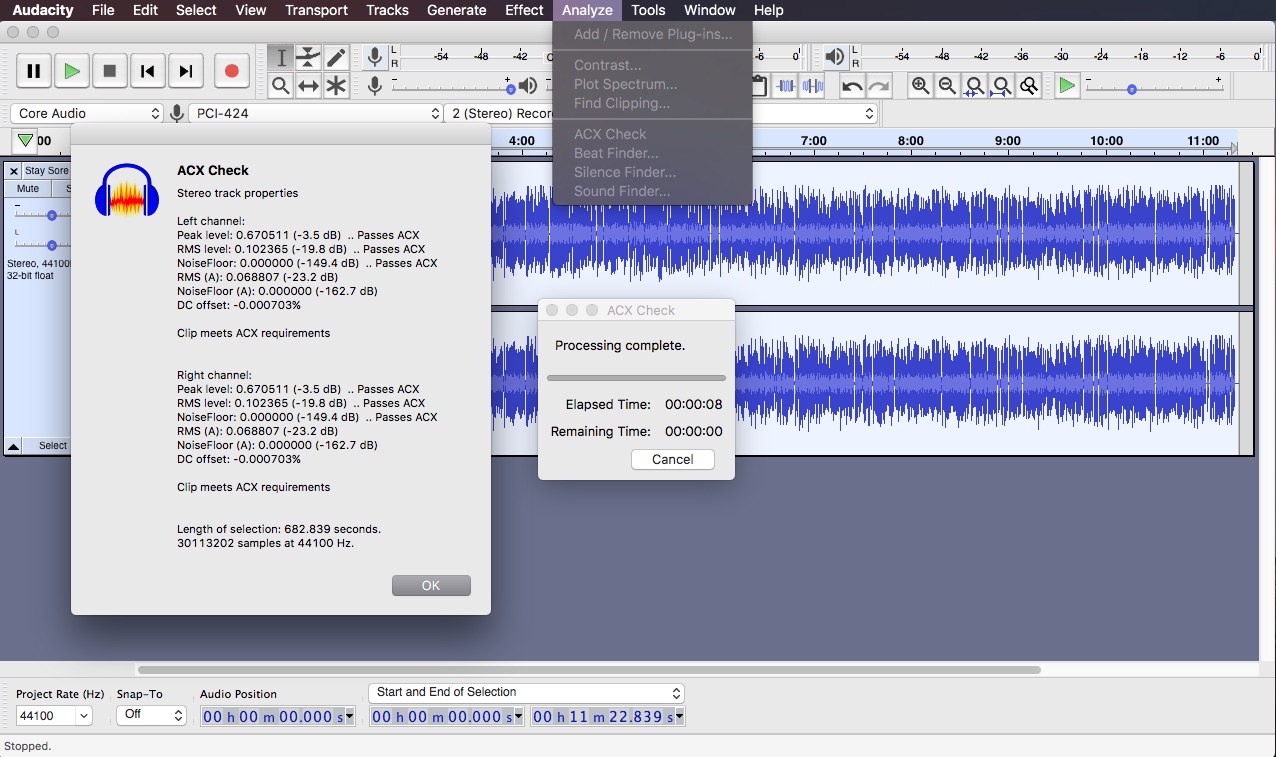
Image Source: Bad Racket Recording Studio
ACX Check helps audiobook creators meet Audible’s strict technical requirements through audio analysis. This analyzer plugin checks if your recordings match ACX specifications before you submit them. You can avoid rejection and rework by using this tool.
ACX Check Key Features
ACX Check looks at several vital audio parameters:
- Peak level measurement: Confirms maximum peak levels stay below -3dB
- RMS level verification: Will give a performance loudness between -18dB and -23dB
- Noise floor analysis: Finds the quietest 500ms section to check levels below -60dB
- Specific warnings: Alerts you about sample rate issues, excessive length, unnatural silence, and other compliance problems
The plugin shows results right after it analyzes your selected audio. This makes finding problems before submission straightforward.
ACX Check Pros and Cons
Pros:
- Free to download and use
- Simple one-click analysis process
- Merges directly with Audacity’s Analyze menu
- Shows clear warnings with helpful explanations
Cons:
- Might not match ACX’s internal testing tools
- Checks only technical measurements (not editing quality)
- Analyzes selected audio segments only (not entire projects)
- Needs at least 1/2 second of audio to work
ACX Check Pricing
You’ll find ACX Check in Audacity’s official plugin repository completely free. The full functionality comes with no subscription or payment needed.
ACX Check Best Use Case
We designed ACX Check for audiobook narrators who create content for Audible, Amazon, and iTunes. Yes, it is a must-have tool if you submit to these platforms because of their strict technical requirements. The plugin quickly spots issues with peak levels, RMS values, and noise floor before submission. This saves you from the hassle and delays of having your audiobooks rejected for technical reasons.
ReaPlugs

Image Source: GitHub
ReaPlugs is a strong collection of high-quality VST plugins that comes from the prominent REAPER digital audio workstation. Users can access professional-grade audio processing tools through this free package.
ReaPlugs Key Features
ReaPlugs has several powerful components:
- ReaComp: Ultra-configurable compressor that has sidechain capability, feedback compression, and program-dependent auto-release
- ReaXcomp: Unlimited band compressor that has per-band controls and visual graph editing
- ReaEQ: Versatile equalizer that supports unlimited bands with precise frequency response display
- ReaFIR: FFT-based processor that works as EQ, compressor, gate, and noise removal tool
- ReaDelay: Multi-tap delay system that has feedback, filtering, and resolution reduction per tap
- ReaGate: Configurable gate with advanced controls that include hysteresis and MIDI triggering
ReaPlugs Pros and Cons
Pros:
- Quick, responsive interfaces with excellent metering
- Low CPU and RAM usage
- No copy protection or activation needed
- Simple installation – just copy files and run
- Clean sound processing without coloration
Cons:
- Windows-focused and needs WINE for other platforms
- Beginners might find the interface challenging
- Plugins show up in different categories in Audacity’s menu
ReaPlugs Pricing
The package is free to download and use. Users get professional-quality plugins at no cost – tools that usually come with paid suites.
ReaPlugs Best Use Case
ReaPlugs stands out for users who need clean, efficient processing without sound coloration. The package helps users explore REAPER’s ecosystem. Podcast producers will find ReaComp perfect for vocal dynamics control, while musicians can use ReaEQ’s unlimited bands to shape frequencies precisely.
OTT Compressor

Image Source: Audio Plugins for Free
OTT Compressor started as a tool for electronic music production and now brings powerful multiband compression to your Audacity toolkit. Xfer Records offers this free VST plugin that recreates the popular “Over The Top” compression technique from Ableton Live.
OTT Compressor Key Features
The OTT Compressor delivers powerful dynamic processing capabilities:
- Three-band Processing: Audio splits into low (below 88.3 Hz), mid (88.3 Hz to 2.5 kHz), and high (above 2.5 kHz) frequency bands
- Dual Compression: The plugin makes quiet sounds louder with upward compression and loud sounds quieter with downward compression
- Visual Feedback: White markers show the original signal level while yellow indicators display the compressed signal
- Depth Control: A dry/wet knob lets you blend processed and unprocessed signals
- Time Parameter: One control adjusts attack and release times for all bands
OTT Compressor Pros and Cons
Pros:
- Download costs nothing
- Easy-to-use interface with basic controls
- Light on CPU resources
- Creates signature electronic music sound
- The GUI gets better with each update
Cons:
- You can’t adjust crossover frequencies
- Latency of 2 samples
- Aggressive settings sound harsh
- Documentation needs improvement
- Crossover points show phase issues
OTT Compressor Pricing
Xfer Records provides OTT Compressor as a free download. You get full functionality without any subscription or license.
OTT Compressor Best Use Case
The plugin works best on:
- Electronic bass to improve dynamics and presence
- Drum loops that need thicker, punchier sounds (use it carefully to keep the groove)
- Synthesizer sounds to create that classic squashed electronic effect
- Atmospheric elements and real-life sounds like rain or birds
- Master bus to glue the mix together (10-20% depth works best)
MEqualizer

Image Source: MeldaProduction
MEqualizer offers precise sound shaping through an efficient yet powerful 6-band equalizer that’s easy to use. This plugin is part of the MFreeFXBundle collection and combines simplicity with advanced processing capabilities for Audacity users.
MEqualizer Key Features
This professional equalizer puts powerful tools at your fingertips:
- Six adjustable bands with 7 filter types per band for detailed frequency control
- Tube saturation integration adds vintage analog warmth and character
- Advanced visualization with spectrum analyzer and sonogram helps you make precise adjustments
- M/S processing lets you equalize mid and side signals separately
- Harmonics control boosts upper frequencies in each band
MEqualizer Pros and Cons
Pros:
- Easy-to-use drag-and-draw interface
- Advanced GUI lets you compare multiple settings
- Works with VST, VST3, AU and AAX interfaces on all platforms
- Runs smoothly on modern processors with AVX2 and AVX512 support
Cons:
- You get only six bands for both mid and side processing
- Free version’s visualization feels cramped
- Main window’s values can strain your eyes
- Sometimes steals key commands from your DAW
MEqualizer Pricing
You can get MEqualizer free with the MFreeFXBundle package. The $49 upgrade unlocks a resizable interface and extra features.
MEqualizer Best Use Case
Audacity users will love MEqualizer’s quick, simple equalization and tube-style warmth. The plugin shines when sculpting vocals or adjusting instrument tone with its vintage-inspired sound. Its parallel EQ feature with a dry/wet knob makes it perfect for mastering when you need subtle tweaks.
LADSPA Plugin Suite
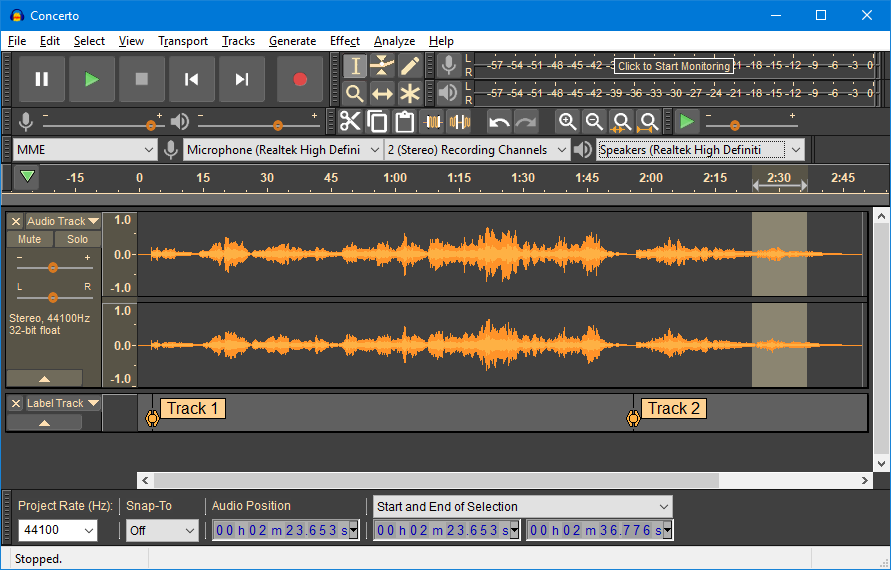
Image Source: KVR Audio
LADSPA (Linux Audio Developer’s Simple Plugin API) stands as one of Audacity’s oldest compatible plugin formats. This system started on Linux but now works on many platforms through various ports.
LADSPA Plugin Suite Key Features
LADSPA’s ecosystem provides powerful technical capabilities:
- Audio generators and analysis tools complement its effects processing
- Users can save their presets within Audacity’s environment
- The system’s latency compensation adjusts waveform delays automatically
- Windows users can access these plugins through DLL files
LADSPA Plugin Suite Pros and Cons
Pros:
- The software remains free and open-source
- Audio applications on Linux work seamlessly with these plugins
- Steve Harris and other developers have created extensive plugin libraries
Cons:
- The codebase is old and lacks active maintenance
- The newer LV2 standard has officially replaced it
- Most plugins contain bugs and haven’t seen updates in years
- Modern alternatives offer better preset functionality
LADSPA Plugin Suite Pricing
Users can access the complete LADSPA ecosystem at no cost.
LADSPA Plugin Suite Best Use Case
LADSPA plugins serve specific needs within Audacity due to their age and limitations. Linux audio production environments and specialized audio processing tasks benefit most from these tools. Audacity’s developers have mentioned that “we have recently been discussing retiring these plug-ins,” so users should proceed with caution.
Comparison Table
| Plugin Name | Key Features | Pricing Model | Platform Compatibility | Best For | Notable Pros | Notable Cons |
|---|---|---|---|---|---|---|
| CrumplePop | AI-powered audio restoration tools, 9 specialized plugins including Voice Enhance, AudioDenoise | Free starter plan, $18-29/month subscription, $599 perpetual | Windows, Mac | Podcasting, content creation | Local processing, immediate results | Individual plugins can’t be purchased separately |
| Muse FX | 12 effects including reverb, delay, compressor, EQ | Free | Windows, Mac | Beginners, simple audio improvements | Wide variety of effects, accessible interface | Limited controls for advanced users |
| Valhalla Super Massive | 22 reverb/delay modes, spatial effects | Free | Windows, Mac | Sound design, atmospheric effects | Low CPU usage, regular updates | Installation challenges with Audacity |
| MFreeFXBundle | 38 effects across multiple categories | Free with limited features, $51 upgrade | Windows, Mac | Audio manipulation of all types | Complete collection, no internet needed | Can’t save presets in free version |
| TDR Nova | 4-band dynamic EQ, parallel processing | Free standard, paid GE version | Windows, Mac | Problem-solving EQ tasks | Versatile processing, accessible interface | Limited to 4 bands in free version |
| Graillon 3 | Three pitch engines, vocal processing tools | Free simple version, $29 full version | Windows, Mac, Linux | Vocal recording, pitch correction | Low CPU usage, multiple format support | Full edition needed for advanced features |
| FFmpeg | Multi-format audio support, video extraction | Free | Windows, Mac, Linux | Format conversion, media compatibility | Extensive format support, open-source | Complex installation process |
| ACX Check | Audiobook specification verification | Free | Not specified | Audiobook production | Simple one-click analysis | Limited to technical measurements |
| ReaPlugs | Professional audio processing suite | Free | Windows (WINE for others) | Transparent audio processing | Low CPU usage, no activation needed | Windows-focused, complex interface |
| OTT Compressor | Three-band compression, upward/downward processing | Free | Not specified | Electronic music production | Simple interface, signature sound | Fixed crossover frequencies |
| MEqualizer | 6-band EQ with tube saturation | Free (part of MFreeFXBundle) | Windows, Mac | Quick EQ adjustments | Accessible interface, multiple formats | Limited to six bands |
| LADSPA Plugin Suite | Simple audio effects and analysis tools | Free | Linux (ports for others) | Linux audio production | Open-source, wide compatibility | Outdated, minimal support |
Conclusion
These 12 remarkable plugins give you all the tools you need to reshape your Audacity experience. The powerful additions extend Audacity’s capabilities way beyond the reach and influence of its stock features. Users from beginners to experts can achieve professional-quality results.
This plugin collection shines through its diversity. You’ll find CrumplePop’s AI-powered audio restoration for clean podcast recordings, Valhalla Super Massive for otherworldly reverb effects, and specialized tools like ACX Check for audiobook production. Each plugin serves a unique purpose in your audio projects.
The best part? Most plugins are completely free or pack substantial features in their free versions. This accessibility lines up with Audacity’s open-source philosophy and makes professional audio editing available to creators on any budget.
Installing multiple plugins might seem daunting at first. The process becomes simple once you get familiar with Audacity’s plugin system. Each new addition will substantially boost your workflow and expand your creative options.
Next time you fire up Audacity, give these plugins a try. Test Graillon 3 for vocal enhancements, check out MFreeFXBundle’s 38 effects, or use TDR Nova to fix specific audio issues. Your projects will without doubt improve with these powerful tools that help you find new ways to refine your sound.
The right plugin can turn a good audio project into a great one. This complete collection lets you take your Audacity productions to professional levels without spending much money.